
I recently published a Karabiner trick that turned
[kbd semicolon] plus [kbd j / i / k / l] into arrow keys. I’ve
determined that my implementation could use some work.
Here’s the redux.
[series_list KeyBinding]
The original tip used Karabiner to turn [kbd semicolon] into a
[kbd Fn] key when pressed with other keys, and allowed a
double tap to add additional functionality. Then the arrow keys were
assigned with BetterTouchTool. This implementation ended up being a bit
flaky when it came to switching directions, key repeats, and
the normal functionality of the semicolon key.
I completely re-implemented this using just Karabiner, which
is much smoother and solves all of the above issues. The
only difference in actual usage is that instead of a double
tap to get [kbd Fn-arrow] functionality, it uses the
quote key (to the right of semicolon). The result functions
perfectly with other modifier keys like [kbd cmd]
[kbd shift] and [kbd option] for selections.
All of the snippets in this post are gathered into this gist.
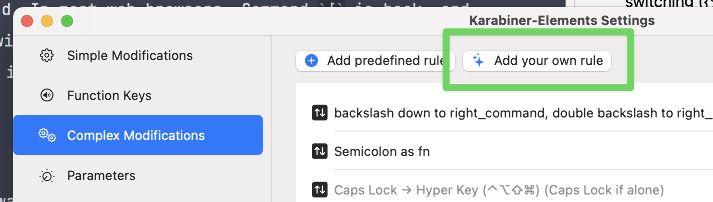
To use this setup, you need four new rules in Karabiner. For
each of the following snippets, go to Complex
Modifications, select Add your own rule, and paste each
snippet into its own rule.
Obviously with a tiny bit of editing you can make any of these
function with Vim-style [kbd h / j / k / l] keys.
First, we make the [kbd semicolon] function as
Left-[kbd Command-Fn] when pressed with other keys,
posting [kbd semicolon] as usual when pressed and released alone.
[gist e230c0799334eb9b333398741f60d2c1 semicolon-to-left-cmd-fn.json]
Next, we make the [kbd quote] key function as
Right-[kbd cmd-fn] when held with other keys,
posting [kbd quote] when pressed alone.
[gist e230c0799334eb9b333398741f60d2c1 quote-to-right-cmd-fn.json]
Now we assign our [kbd j / i / k / l] keys to
[kbd left / up / down / right] when pressed along
with the [kbd semicolon] key (which is now Left-[kbd cmd-fn]).
To make this into [kbd h / j / k / l] navigation, change the
"key_code": "k"lines to h, j, k, and l, in that order.
[gist e230c0799334eb9b333398741f60d2c1
left-cmd-fn-jkil-to-arrow.json]
And lastly, we assign [kbd j / i / k / l] keys to
[kbd home / pgup / pgdn / end] when pressed along
with the [kbd quote] key.
[gist e230c0799334eb9b333398741f60d2c1 right-cmd-fn-jkil-to-fn-arrow.json]
Now you can hold down [kbd semicolon] and use
[kbd j / i / k / l] as arrow keys, and key repeat,
switching between directions, and modifier-based selections
will all work smoothly. Hold down [kbd quote] and use the
same keys to navigate with [kbd home / pgup / pgdown / end].
Enjoy!
Leave a Reply